Basic drawing tool for kids to practice mouse skills with colors, brushes, and stamps
Basic drawing tool for kids to practice mouse skills with colors, brushes, and stamps
Pros
- Extremely easy to use
- Kid-friendly, colorful interface
- Very lightweight and fast
- Fun stamps foster creativity
Cons
- No save or undo functions
- Limited brush and tool options
- Stamps cannot be resized or moved
- Grows outgrown quickly as skills develop
A no-frills painting program ideal for introducing young children to digital art.
Overview
Simple Paint provides a straightforward digital drawing experience tailored for beginners, especially young children learning how to use a mouse. The application centers around an uncluttered design without overwhelming options, making it easy for new users to jump right into creating artwork.
User Interface and Usability
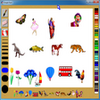
Simple Paint features a clean layout—users are greeted with a blank canvas, a palette of vivid colors, and a selection of basic paintbrush sizes. All primary actions are clearly visible, reducing the risk of confusion. The absence of menus or hidden features means newcomers can focus directly on drawing.
Drawing Tools and Features
The software offers a set of simple paintbrushes in various widths. These tools work as expected, producing solid lines and shapes without additional effects such as gradients or patterns. Beginners can use the eraser to clear the entire canvas and are able to fill the background with a single color quickly.
A distinctive element of Simple Paint is its collection of bright, cartoonish stamps, including animals, flowers, and fun figures. Users simply select the desired stamp and click on the canvas to add it. Stamps add a playful aspect to the app, but their functionality is basic—once placed, they cannot be resized or repositioned.
Performance and Limitations
Simple Paint is very lightweight and launches quickly even on low-end systems. Its simplicity, however, comes with some notable limitations. There is no option to undo actions or save work within the application, potentially leading to frustration if a mistake is made or if a user wants to keep their creation. Artwork must be preserved via alternative means, such as taking a screenshot.
Suitability
This program is best suited for very young users who are exploring digital painting for the first time and are not concerned with advanced features. It is effective for teaching fundamental mouse control and introducing creative computer-based activities in a safe, distraction-free environment.
Conclusion
Simple Paint delivers on its promise of a basic, accessible painting application. It offers just enough to let children experiment with colors and shapes, but lacks the depth or development-friendly features found in more robust art software. For basic learning and entertainment, Simple Paint suffices; users seeking more flexibility or creative options may want to explore other alternatives.
Pros
- Extremely easy to use
- Kid-friendly, colorful interface
- Very lightweight and fast
- Fun stamps foster creativity
Cons
- No save or undo functions
- Limited brush and tool options
- Stamps cannot be resized or moved
- Grows outgrown quickly as skills develop